
Features
| Voice | HD voice |
|---|---|
| Display | 7-inch adjustable color touchscreen |
| Connectivity | Dual Gigabit Ethernet ports, built-in Wi-Fi |
| Audio | Optima HD voice technology |
| SIP Accounts | Up to 16 SIP accounts |
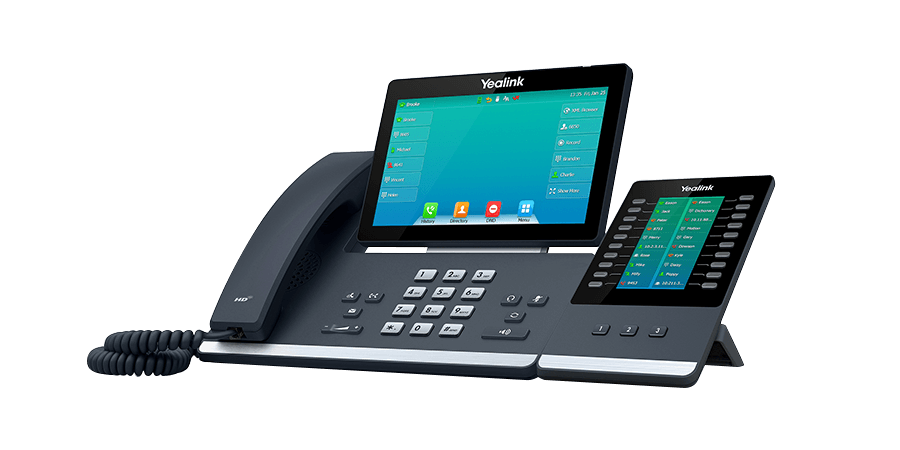
| Expansion Module | Compatible with EXP50 |
| User Interface | Touchscreen with customizable keys |
| Bluetooth | Built-in Bluetooth |
| USB Ports | Dual USB ports for accessories |
| Power | Power over Ethernet (PoE) |
| Codec | Opus codec support |
| Screen Adjustment | Adjustable tilt for comfortable viewing |
Description
Yealink SIP T57W Price in Pakistan
Why Choose the Yealink SIP T57W?
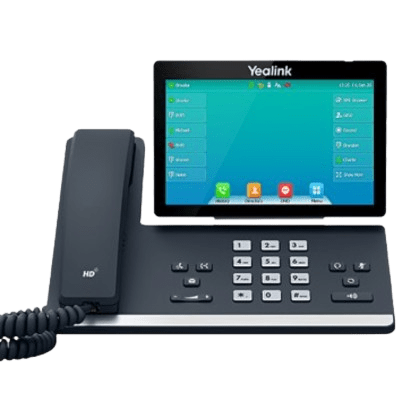
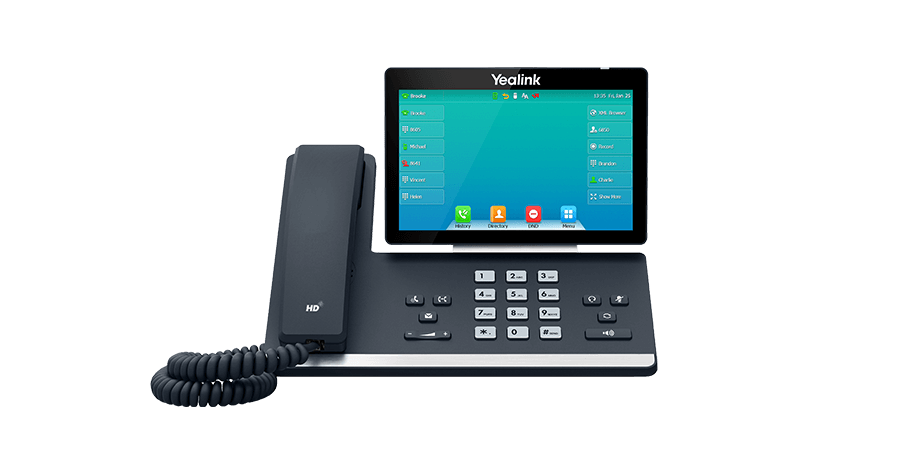
The Yealink SIP-T57W is a premium executive VoIP IP phone designed for professionals, managers, and business executives who require an advanced communication solution. Featuring a 7-inch adjustable touchscreen, built-in dual-band Wi-Fi, Bluetooth 4.2, Gigabit Ethernet, and HD Voice technology, the SIP-T57W delivers exceptional call quality and productivity. Whether you’re upgrading your office IP phone system or deploying a new VoIP business solution, this enterprise desk phone offers flexibility, reliability, and a modern user experience.
Browse our complete range of IP Phones, IP PBX systems, and VoIP communication solutions at IPPBX.com.pk
Yealink SIP-T57W Price in Pakistan
The Yealink SIP-T57W is built for demanding business environments where communication efficiency matters. Its intuitive touchscreen interface, wireless connectivity, USB support, and compatibility with major SIP-based PBX platforms make it an excellent choice for corporate offices, call centers, and enterprise deployments. The phone supports up to 16 SIP accounts, allowing users to manage multiple business lines from a single device.
Yealink SIP-T57W Features
Key Features
- 7-inch Adjustable Capacitive Touchscreen Display
- Supports Up to 16 SIP Accounts
- Built-in Dual-Band Wi-Fi (2.4GHz & 5GHz)
- Integrated Bluetooth 4.2
- Yealink Optima HD Voice
- Acoustic Shield Noise Cancellation Technology
- Dual Gigabit Ethernet Ports
- Power over Ethernet (PoE) Support
- USB 2.0 Port for Recording & Expansion
- Supports Expansion Modules
- Wireless Headset Compatibility
- Busy Lamp Field (BLF)
- Local 1000 Contact Directory
- IPv4 & IPv6 Support
- Secure SIP over TLS & SRTP Encryption
Yealink SIP-T57W Specifications
| Specification | Details |
|---|---|
| Model | Yealink SIP-T57W |
| Display | 7″ Adjustable Color Touchscreen |
| Resolution | 800 × 480 Pixels |
| SIP Accounts | Up to 16 |
| Voice Quality | Yealink Optima HD Voice |
| Wi-Fi | Built-in Dual-Band 2.4G/5G |
| Bluetooth | Bluetooth 4.2 |
| Ethernet Ports | 2 × Gigabit RJ45 |
| PoE | IEEE 802.3af |
| USB Port | USB 2.0 |
| Headset Support | USB, Bluetooth, RJ9, EHS |
| Security | TLS, SRTP, HTTPS |
| Mounting | Desktop & Wall Mount |
| Ideal For | Executives, Enterprises, Corporate Offices |
Why is the Yealink SIP-T57W Ideal for Business Communication?
The Yealink SIP-T57W is engineered to improve workplace productivity through advanced VoIP capabilities and a user-friendly interface. The adjustable touchscreen provides quick access to contacts, call history, voicemail, and business applications, while built-in Wi-Fi and Bluetooth eliminate unnecessary cables for a cleaner workspace.
Support for multiple SIP accounts, HD audio, conference calling, and expansion modules makes it suitable for executives, receptionists, and professionals who handle high call volumes. It integrates seamlessly with popular IP PBX systems and cloud VoIP platforms, making deployment simple for businesses of all sizes.
Where Can the Yealink SIP-T57W Be Used?
The Yealink SIP-T57W is ideal for:
- Corporate Offices
- Executive Workstations
- Call Centers
- Reception Desks
- Customer Support Teams
- Financial Institutions
- Healthcare Facilities
- Educational Institutions
- Government Offices
- Enterprise Businesses
Why Buy the Yealink SIP-T57W?
The Yealink SIP-T57W offers numerous advantages for professional users:
- Premium executive IP phone
- Large adjustable touchscreen display
- Crystal-clear HD Voice quality
- Built-in Wi-Fi and Bluetooth
- Gigabit network connectivity
- Secure business communication
- Supports multiple SIP accounts
- Expandable for growing businesses
- Compatible with leading SIP providers
- Trusted Yealink enterprise quality
Explore professional SIP phones and VoIP communication devices at IPPhone.com.pk
Should You Buy the Yealink SIP-T57W?
If you’re looking for a high-end SIP phone with premium audio, wireless connectivity, touchscreen functionality, and enterprise-grade performance, the Yealink SIP-T57W is an outstanding choice. Its combination of advanced collaboration features, robust security, and seamless IP PBX compatibility makes it a reliable communication solution for modern businesses.
Frequently Asked Questions
1. How many SIP accounts does the Yealink SIP-T57W support?
The Yealink SIP-T57W supports up to 16 SIP accounts, making it suitable for busy professionals and enterprise users.
2. Does the Yealink SIP-T57W have built-in Wi-Fi?
Yes. It includes integrated dual-band Wi-Fi (2.4GHz & 5GHz) for flexible wireless deployment.
3. Does the Yealink SIP-T57W support Bluetooth headsets?
Yes. The phone features Bluetooth 4.2, allowing users to connect compatible wireless headsets and mobile devices.
4. Is the Yealink SIP-T57W compatible with IP PBX systems?
Yes. The SIP-T57W is fully compatible with most SIP-based IP PBX systems, cloud PBX platforms, and hosted VoIP services.
5. Why should I choose the Yealink SIP-T57W?
The Yealink SIP-T57W combines a large touchscreen display, HD Voice, Wi-Fi, Bluetooth, Gigabit networking, advanced security, and support for multiple SIP accounts, making it an excellent executive VoIP IP phone for professional business communication.
Key Takeaway
The Yealink SIP-T57W is a premium executive VoIP IP phone that delivers exceptional performance for modern workplaces. With its 7-inch adjustable touchscreen, 16 SIP accounts, built-in Wi-Fi, Bluetooth, Gigabit Ethernet, HD Voice, and enterprise-grade security, it provides an ideal communication solution for executives, corporate offices, and organizations seeking a reliable and feature-rich business IP phone.
Reviews
There are no reviews yet.