
Logitech Video Conferencing Price in Pakistan
Logitech is a Swiss company whose video conferencing products such as Rally Bar, MeetUp and ConferenceCam are used in meeting rooms with Microsoft Teams, Zoom and Google Meet. Browse all conference cameras.
Products
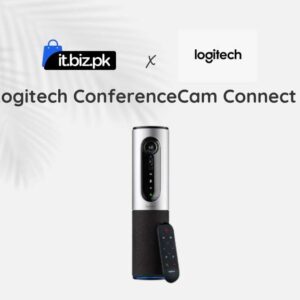
Looking for the best Logitech video conferencing price in Pakistan? Logitech offers professional video conferencing equipment for businesses, corporate offices, schools, training centers, and remote teams. Its solutions help people communicate clearly during online meetings, presentations, and hybrid conferences.
Whether you need a simple conference camera for a small meeting room or a complete video conferencing system for a large boardroom, Logitech offers different products to meet your requirements. Its range includes Rally systems, MeetUp conference cameras, GROUP systems, video bars, microphones, and other meeting room accessories.
At IT.BIZ.PK, you can explore Logitech video conferencing solutions and compare their features before making a purchase. Check the latest product listings for current prices, availability, and specifications in Pakistan.
Logitech Video Conferencing Price in Pakistan
The Logitech video conferencing price in Pakistan depends on the product model, camera quality, audio coverage, room size, included accessories, and software compatibility. Basic conference cameras and speakerphone systems can suit smaller teams, while advanced video bars and modular conference systems are designed for professional meeting spaces. Complete room solutions with touch controllers and additional microphones may cost more than standalone cameras. When comparing prices, consider the total cost of the setup rather than the camera alone. You may also need mounting accessories, expansion microphones, a meeting room controller, or compatible conferencing software. Prices can change according to stock, warranty, supplier, and configuration. Check the current listings on IT.BIZ.PK before placing an order.Popular Logitech Video Conferencing Products
1. Logitech MeetUp
Logitech MeetUp is an all-in-one conference camera designed for huddle rooms and smaller meeting spaces. It combines a wide-angle camera with integrated microphones and speakers, helping teams conduct meetings without installing several separate devices. Its compact design makes it suitable for rooms where a laptop webcam cannot capture everyone around the table. Depending on the setup, MeetUp can work with compatible video conferencing applications and meeting room systems. Best for: Small meeting rooms, huddle spaces, and compact offices.2. Logitech GROUP Video Conferencing System
Logitech GROUP is designed for medium to larger meeting rooms. The system combines a conference camera with audio equipment to help participants communicate clearly during business meetings. Compatible expansion microphones can extend audio pickup for larger groups. This makes the system useful for companies that regularly hold discussions with remote employees, customers, and business partners. Before purchasing, check the included accessories and whether additional microphones are needed for your room. Best for: Medium-sized conference rooms, team meetings, and business discussions.3. Logitech Rally System
Logitech Rally is a professional conference room solution designed for high-quality video meetings. Depending on the configuration, the system can include a PTZ camera, speakers, microphone pods, and other components. Its modular design allows businesses to create a setup that suits their room layout. Selected configurations support advanced camera control and intelligent audio features. Rally systems are worth considering when your organization needs a dedicated conference room installation. Best for: Corporate meeting rooms, boardrooms, and professional collaboration spaces.4. Logitech Rally Bar
Logitech Rally Bar combines video, audio, and conferencing functions in an all-in-one video bar. It is designed for medium to larger meeting spaces and can simplify the installation of professional video conferencing equipment. Selected configurations support intelligent camera features and integration with compatible meeting platforms. Businesses should confirm whether they need an appliance-based setup or a connection to a room computer. The Rally Bar can be paired with compatible meeting room controllers and accessories for a more complete experience. Best for: Medium-sized meeting rooms, hybrid meetings, and modern corporate offices.5. Logitech Rally Bar Mini
Logitech Rally Bar Mini is a compact video bar designed for smaller meeting rooms. It combines camera and audio equipment in one unit, helping businesses reduce cable clutter and simplify setup. Depending on the deployment, it can support compatible video conferencing platforms and meeting room configurations. It is a useful option for organizations that want professional collaboration features without installing a large modular system. Best for: Small to medium meeting rooms, huddle spaces, and modern offices.6. Logitech BCC950 ConferenceCam
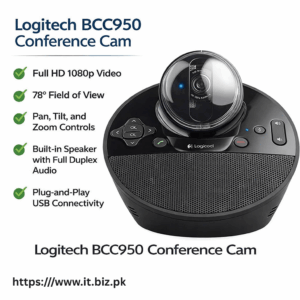
Logitech BCC950 combines a webcam and speakerphone in a compact conferencing device. It is designed for small groups and can be suitable for teams that need a simple way to conduct video meetings. Its integrated design can help reduce the need for separate camera and audio equipment. It may be a practical choice for small offices and shared workspaces. Best for: Small teams, home offices, and compact meeting spaces.7. Logitech PTZ Pro 2
Logitech PTZ Pro 2 is a conference camera with pan, tilt, and zoom functionality. These controls allow users to adjust the camera view to focus on a presenter, meeting participants, or a specific area of the room. It can be useful for larger rooms where a fixed webcam may not provide enough flexibility. Check the required connection, audio equipment, mounting arrangement, and software compatibility before purchasing. Best for: Training rooms, presentation spaces, and larger conference environments.Key Features of Logitech Video Conferencing Systems
High-Quality Video
Selected Logitech conference cameras support Full HD or 4K video, depending on the model. Higher-resolution video can help remote participants see presentations and meeting attendees more clearly. The final video quality also depends on lighting, internet performance, conferencing software, and the connected system.Clear Audio
Good audio is essential for productive meetings. Logitech systems offer different microphone and speaker arrangements to suit various room sizes. For larger rooms, additional microphones may help capture voices from more seating positions. Always check the recommended audio coverage for the chosen system.Wide Camera Coverage
Wide-angle cameras can capture more participants in a room. PTZ cameras also allow users to change the view through pan, tilt, and zoom controls. Choose the camera based on the room layout, seating arrangement, and distance between participants and the display.Easy Meeting Setup
All-in-one video bars and integrated conference systems can reduce the number of separate devices needed in a meeting room. However, setup requirements vary. Some configurations may need a dedicated room computer, touch controller, network connection, or compatible meeting room software.Compatibility with Meeting Platforms
Logitech equipment can work with supported conferencing platforms such as Zoom and Microsoft Teams. Compatibility depends on the product, software version, and deployment mode. Before ordering, confirm that the selected device supports your organization's preferred meeting platform.How to Choose the Right Logitech Video Conferencing System
Selecting the right system starts with understanding your meeting environment. Room size: Small huddle rooms may need a compact camera or video bar. Medium and large conference rooms may require a more advanced system with wider camera coverage and additional microphones. Number of participants: Consider how many people usually attend meetings and how far they sit from the camera and microphones. Camera requirements: Full HD may be enough for many everyday meetings. A 4K-capable system may be preferable when you need more detailed video, depending on your conferencing setup. Audio coverage: Check microphone pickup, speaker output, and expansion options. Larger rooms may need additional audio components. Connectivity: Review USB, HDMI, network, and other connection requirements. Make sure the equipment works with your existing computers and displays. Software compatibility: Confirm support for your preferred conferencing platform and decide whether you need a standalone USB device or a dedicated room system. Budget and warranty: Compare the complete setup cost, accessories, warranty coverage, installation, and after-sales support.Why Buy Logitech Video Conferencing Equipment from IT.BIZ.PK?
IT.BIZ.PK helps businesses explore IT products for professional communication and collaboration. Comparing Logitech video conferencing systems can help you find a solution that matches your room size, meeting style, and budget. Before purchasing, confirm these details:- Exact Logitech model and product code
- Current price and stock availability
- Camera resolution and viewing features
- Microphone and speaker configuration
- Included cables, mounts, and accessories
- Compatibility with Zoom, Microsoft Teams, or other supported platforms
- Warranty terms and installation requirements
- Availability of expansion microphones and replacement accessories