
SSD & RAM Price in Pakistan 2026 | Latest Rates
SSD and laptop RAM upgrades from WD, Laxar and more.
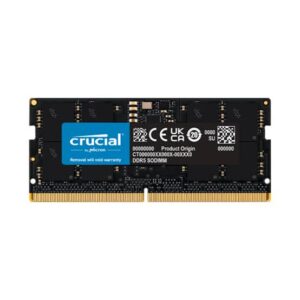
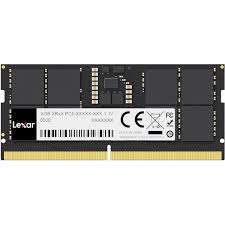
SSD and RAM are two important computer components that can improve your computer's speed and overall performance. If your laptop takes too long to start, applications load slowly or your computer struggles with multiple tasks, upgrading its storage or memory may help.
An SSD helps your computer start faster and load files quickly. RAM allows your computer to handle multiple applications and tasks at the same time. Both components are available in different capacities, speeds and types.
At IT.BIZ.PK, you can explore SSDs and RAM for laptops and desktop computers. Compare different brands, specifications and prices to find the right upgrade for your system.
Latest SSD & RAM Price in Pakistan
The SSD and RAM price in Pakistan depends on the brand, capacity, speed, technology and compatibility. SSD prices vary according to storage capacity and interface. SATA SSDs are commonly used to upgrade older computers, while NVMe SSDs offer faster data transfer speeds on compatible systems. RAM prices depend on the memory generation, capacity, speed and form factor. DDR4 and DDR5 are common choices for modern computers, while DDR3 memory is still used in some older systems. Popular brands include Kingston, Samsung, Lexar, Crucial, Western Digital, Corsair, ADATA, Hiksemi and Apacer.SSD Price in Pakistan
An SSD, or Solid State Drive, is a storage device that saves your operating system, software, games, documents and other files. Unlike traditional hard drives, SSDs use flash memory and have no moving mechanical parts. An SSD can make a computer feel much faster, especially when replacing an older mechanical hard drive.Types of SSDs
1. SATA SSD SATA SSDs are common storage upgrades for laptops and desktop computers. They are available in the 2.5-inch form factor and can also come in M.2 versions. They are suitable for everyday tasks, office work, browsing and general computer use. A 2.5-inch SATA SSD can be a good choice for an older computer that supports this connection. 2. NVMe SSD NVMe SSDs use the PCIe interface to transfer data at higher speeds than traditional SATA SSDs. They are commonly available in the M.2 2280 form factor. NVMe drives are useful for gaming, professional applications, large file transfers and fast system performance. Check your motherboard or laptop specifications to confirm NVMe support. 3. External SSD External SSDs connect through USB or USB-C ports. They are useful for backups, transferring files and carrying data between different computers. Some portable SSDs offer high transfer speeds and compact designs. Check the supported USB standard and your computer's port before buying.Popular SSD Brands in Pakistan
- Kingston: SATA and NVMe storage drives for laptops and desktops.
- Samsung: SSDs for everyday computing, gaming and professional workloads.
- Lexar: Internal and external SSD options in different capacities.
- Western Digital: Storage products for personal and professional use.
- Crucial: SSDs designed for computer upgrades and daily performance.
- Hiksemi: Affordable SSD options for different storage needs.
- ADATA: SATA and NVMe storage products.
RAM Price in Pakistan
RAM stands for Random Access Memory. It temporarily stores data that your computer needs while running programs. More compatible RAM can help your system handle multiple applications smoothly. For example, a computer with more memory may perform better when you open several browser tabs, work with large documents or use professional software.Types of RAM
1. DDR3 RAM DDR3 is an older memory generation found in some older laptops and desktop computers. It is not compatible with DDR4 or DDR5 slots. If you have an older computer, check its motherboard or laptop specifications before purchasing DDR3 memory. 2. DDR4 RAM DDR4 is widely used in laptops and desktop PCs. It offers different capacities and speeds for office work, education, gaming and professional applications. Popular options include 8GB, 16GB and 32GB DDR4 modules. 3. DDR5 RAM DDR5 is a newer memory generation designed for supported modern systems. It offers higher memory bandwidth and is available in different capacities and speeds. It is a suitable option for compatible newer desktop computers and laptops, especially for demanding applications and gaming.Laptop RAM vs Desktop RAM
Laptop RAM and desktop RAM have different physical sizes.- SO-DIMM: Smaller memory modules commonly used in laptops and compact computers.
- UDIMM: Full-size memory modules commonly used in desktop computers.
Popular RAM Brands in Pakistan
Several brands offer memory modules for different types of computers.- Kingston: Desktop and laptop memory for everyday and professional use.
- Lexar: DDR4 and DDR5 memory modules.
- Crucial: Memory upgrades for compatible laptops and desktop PCs.
- Corsair: Gaming and high-performance desktop memory.
- ADATA: Standard and gaming RAM options.
- Apacer: Desktop and laptop memory products.
- G.Skill: Performance memory for gaming and enthusiast systems.
How to Choose the Right SSD and RAM
Before buying an SSD or RAM, check the following points.1. Check Device Compatibility
Not every SSD or RAM module works with every computer. Check your laptop or motherboard model and supported specifications. For SSDs, confirm whether your device supports SATA, M.2 SATA or M.2 NVMe. For RAM, check the supported generation, capacity, speed and form factor.2. Choose the Right SSD Capacity
Your storage needs depend on how you use your computer.- 256GB: Suitable for basic use and light storage needs.
- 512GB: A practical option for office work, study and everyday applications.
- 1TB: Useful for gaming, large files and professional software.
- 2TB or more: Suitable for users who need more storage for projects, media and games.
3. Select the Right RAM Capacity
The required RAM depends on your workload.- 4GB: Limited basic use and older systems.
- 8GB: Everyday browsing, study and office tasks.
- 16GB: Multitasking, business software and many gaming setups.
- 32GB: Heavy applications, advanced multitasking and demanding workloads.
4. Compare Speed and Performance
For RAM, compare the memory generation and speed, usually shown in MHz or MT/s. For SSDs, compare the interface, read and write speeds and supported PCIe generation. Higher specifications do not always mean better performance if your computer cannot support them.5. Check Warranty and Product Condition
Always check whether the SSD or RAM is new or used. Review the seller's warranty, return policy and product details. For storage devices, also consider reliability and backup needs. Important files should always have a separate backup.Buy SSD and RAM Online in Pakistan at IT.BIZ.PK
Upgrading your computer with the right SSD or RAM can improve everyday performance and make your system more useful. Whether you need a 512GB NVMe SSD, a 1TB storage drive, 8GB DDR4 RAM or 16GB DDR5 memory, compare available options before making a decision. IT.BIZ.PK helps users explore computer hardware and IT products for home, office, education and gaming needs. Check the latest SSD and RAM price in Pakistan, compare product specifications and confirm compatibility with your computer. Choose a suitable product based on your storage requirements, memory needs and budget.Frequently asked questions
Is DDR5 RAM compatible with DDR4 laptops?
No. DDR4 and DDR5 use different slots; buy the type your laptop supports.