
HP Desktop Price in Pakistan
HP desktops include Pro Tower business PCs and All-in-One computers that combine screen and PC in one unit. They are a common choice for offices, schools and home users. Browse all desktops.
Products
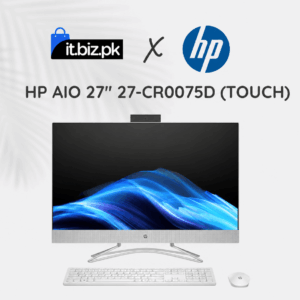
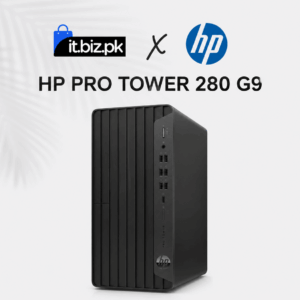
Looking for the latest HP desktop price in Pakistan? HP desktop computers are suitable for offices, schools, businesses, home users, and professionals who need a reliable computer for everyday tasks. With different models, processor options, memory capacities, and storage configurations, you can choose a desktop according to your needs and budget.
Whether you need a computer for office applications, online meetings, business software, education, graphic design, or demanding professional workloads, HP offers several desktop categories to consider.At IT.BIZ.PK, you can explore HP desktop computers and compare available specifications to find the right system for your workplace or home.
HP Desktop Price in Pakistan
The price of an HP desktop in Pakistan depends on its processor, RAM, storage, graphics capabilities, design, operating system, and warranty. A compact desktop for basic office work may cost less than a powerful workstation designed for demanding applications.New HP desktop computers are available in different configurations, including Intel Core i3, Core i5, Core i7, and other processor options. Refurbished and open-box computers may also be available at different prices depending on their condition and warranty.Before purchasing, compare the specifications and confirm the current price, availability, and warranty details for your selected model.Types of HP Desktop Computers
HP ProDesk and Pro Tower Desktop PCs
HP ProDesk and Pro Tower computers are designed for business and office environments. They can be suitable for administrative work, accounting, data entry, customer service, and everyday business applications.Depending on the configuration, these computers may include an Intel processor, SSD storage, integrated graphics, and multiple connectivity options.A business desktop can be a practical choice for companies that need computers for several employees. Before buying, consider the number of users, required software, memory capacity, and future upgrade needs.HP EliteDesk Desktop Computers
HP EliteDesk computers are designed for professional environments where productivity and business features are important. Different models offer different performance levels and physical sizes.They can be used for office applications, multitasking, business management systems, and other professional workloads. Some models are available in compact form factors that help save desk space.When comparing EliteDesk computers, check the processor generation, RAM, SSD capacity, ports, and warranty. These details can vary significantly between models.HP All-in-One Desktop Computers
HP All-in-One PCs combine the computer hardware and display into one unit. This design reduces the number of separate components on a desk and can help create a clean workspace.All-in-one computers may suit reception areas, classrooms, home offices, and businesses that prefer a simple installation.Depending on the model, features may include a Full HD display, integrated speakers, webcam, wireless connectivity, and different processor options.Before purchasing an All-in-One PC, compare screen size, resolution, processor performance, memory, storage, and upgrade options.HP Mini Desktop Computers
HP Mini PCs provide desktop computing in a compact design. They are useful when desk space is limited or when a business needs to install computers in multiple locations.These systems can support everyday office tasks, web applications, online meetings, and business software, depending on their specifications.A mini desktop can be suitable for reception counters, small offices, classrooms, and workstations with limited space. Check its available ports, cooling design, mounting options, and memory capacity before buying.HP Workstations
HP workstation computers are intended for demanding professional tasks. Depending on the model, they may support powerful processors, larger memory configurations, and dedicated graphics cards.Workstations can be suitable for engineering applications, 3D modelling, video production, architecture, and other specialised workloads.If you need a workstation, identify the software you plan to use and review its hardware requirements. A suitable processor, graphics card, RAM capacity, and storage configuration can make a significant difference in performance.HP Gaming Desktop Computers
HP also offers gaming desktop systems under its gaming-focused product lines. These computers are designed for users who need stronger graphics performance for compatible games and creative applications.Depending on the configuration, a gaming desktop may include a dedicated graphics card, a high-performance processor, additional cooling, and upgrade options.Before choosing a gaming PC, compare the graphics card, processor, RAM, storage, power supply, and cooling system. Make sure the system can handle your preferred games and display resolution.How to Choose the Right HP Desktop
Choosing the right HP desktop starts with understanding how you plan to use it.1. Select the Right Processor
The processor affects how quickly a computer handles applications and multitasking.- Intel Core i3: Suitable for many basic office tasks, web browsing, and general computing.
- Intel Core i5: A balanced option for multitasking, business applications, and everyday productivity.
- Intel Core i7: Suitable for heavier workloads and users who need additional processing performance.
- Workstation-class processors: May be appropriate for specialised professional applications, depending on software requirements.